
PBS backup verification vs a real restore test
Proxmox Backup Server can verify your backups, and you should let it. But a verified backup and a backup you know will restore and run are two different things. This guide explains what each one checks.
What a PBS verify job checks #
PBS stores each backup as a set of chunks, and every chunk is identified by the SHA-256 checksum of its content. A verify job reads the chunks a snapshot refers to and checks them against those checksums, so it finds data that has gone bad on the datastore's disks since the backup was written.
Per the PBS documentation, verify jobs:
- run on a schedule you set, per datastore, and can also be started by hand for a datastore, a backup group or a single snapshot;
- can skip snapshots that are already verified, and check them again once their last verification is older than a number of days you choose;
- can send a notification with the result.
Proxmox recommends re-verifying all backups at least monthly, even if they passed before.
There's one limit worth knowing. For encrypted backups the server only has the checksum of the unencrypted data, so it can't check the stored content against it without the key; for encrypted chunks only the CRC-32 checksum is checked.
What verification can't tell you #
A verify job proves the backup is the same as when it was written. It doesn't look inside it. So it can't tell you:
- whether the VM boots: a missing driver, a changed boot order or disk controller, or a broken bootloader all verify cleanly;
- whether its services start and its applications work: a database that was corrupt or mid-write when the backup was taken is backed up, and verified, exactly as it was;
- whether the data you expect is actually in it, for example a disk that was left out of the backup job;
- whether you can restore it at all: an encryption key you no longer have, or a target without enough storage;
- how long a restore takes, which is what your recovery time objective (RTO) depends on.
What a restore test proves #
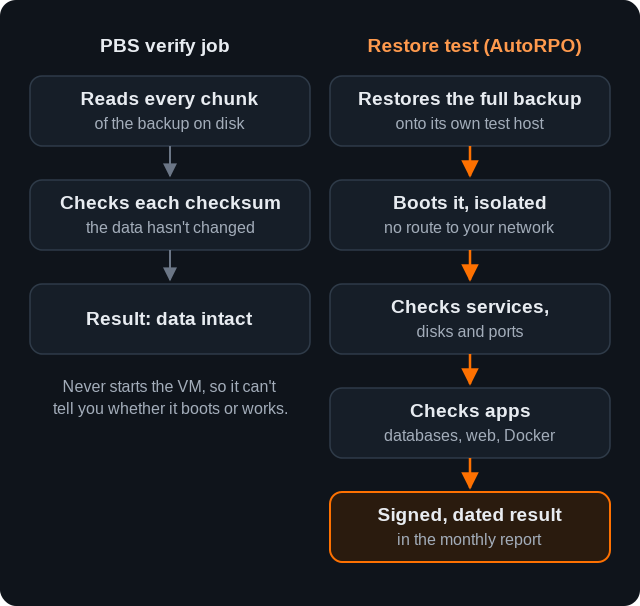 A verify job proves the data is intact. Only a restore test proves the server comes back and works.
A restore test restores the backup onto a real Proxmox VE host, starts it, and checks it. A test that passes shows that, for that backup:
- the restore completed, with the storage and keys you have today;
- the VM booted, with a console screenshot to show it;
- its services, databases and applications came up and answered;
- how old the backup was (your recovery point) and how long the restore and boot took (your recovery time).
A restore also reads every chunk of the snapshot and checks its checksum as it goes, so a completed restore shows that snapshot's data is intact on PBS too.
 What only a restore test catches: the restored print01 started, but its print spooler service did not.
Use both #
They answer different questions, so they complement each other:
| PBS verify job | Restore test | |
|---|---|---|
| Finds chunks damaged on the datastore | Yes, across every snapshot it checks | For the snapshot it restores |
| Proves the VM boots | No | Yes |
| Proves services and applications work | No | Yes, as far as the checks go |
| Measures restore time (RTO) | No | Yes |
| Cost | Reads data on the PBS host | Reads the whole backup over the network, and needs a host to restore onto |
Keep your verify jobs running across every datastore, and restore-test each VM on a schedule that matches how important it is. Verify jobs and restores both read from the same disks, so it helps if they don't run at the same time.
Restore tests without the manual work #
Restoring and checking every VM by hand doesn't scale; How to test Proxmox backups walks through the manual method and its pitfalls. AutoRPO automates it: it restores each VM and container from PBS onto a separate host, on an isolated network, checks it boots and its applications work, and queues the result for sign-off. It pauses testing while PBS is verifying.