
Requirements for Proxmox restore testing
AutoRPO is installed on its own Proxmox VE host, the restore host, and restores backups onto it from your Proxmox Backup Server, or Hyper-V backups on a Windows file share. You don’t need to run Proxmox in production. Nothing runs in our cloud. Hyper-V details: Hyper-V sources.
Restore host
| Item | Minimum | Recommended | Notes |
|---|---|---|---|
| Proxmox VE | 9.x, standalone | 9.x on a dedicated host | Not a member of a Proxmox cluster; setup refuses cluster nodes, so test copies never appear in production. |
| Architecture | x86-64 (amd64) | x86-64 (amd64) | Any 64-bit Intel or AMD CPU with VT-x or AMD-V that Proxmox VE 9 supports. |
| Virtualisation | Intel VT-x or AMD-V | Bare metal | In a VM: CPU type host with nested virtualisation turned on. Test copies boot more slowly when nested. In the cloud: a dedicated server, or a cloud server that offers nested virtualisation. |
| CPU | 4 cores | 8 cores or more | |
| Memory | 8 GiB to install | 16 GiB or more | Enough to boot your largest VM, or every VM of your largest restore group at once, plus 8 GiB AutoRPO keeps free for the host by default. On a smaller host, lower Settings → Restore target → Keep free in host memory, or restores won't start. AutoRPO restores one VM or one restore group at a time. |
| System disk | Proxmox VE's own minimum, plus 20 GB | 100 GB or more | AutoRPO's data lives in /var/lib/autorpo: database, screenshots, Restore Evidence Reports and nightly backups of itself. |
| Test-copy storage | Your largest VM's disks, or your largest restore group's, plus 100 GiB | 1 to 2 TB, SSD | AutoRPO keeps 100 GiB free by default (Settings → Restore target → Keep free on the restore storage). Any Proxmox VE storage that holds VM disks: LVM-thin, ZFS, directory. Faster storage means shorter restores. |
| Network to PBS | 1 Gbit/s | 10 Gbit/s | Each test reads the whole backup. At 1 Gbit/s a 500 GB VM takes 70+ minutes; at 10 Gbit/s your storage sets the pace. |
| Backup server | Proxmox Backup Server 3 (expected to work) | Proxmox Backup Server 4 (tested) | Any number of servers, datastores and namespaces. A read-only token is enough. |
| Hyper-V backups (optional) | Windows Server Backup or Hyper-V exports on an SMB share | QEMU guest agent in each VM | A Windows account that can only read the share (AutoRPO refuses one that can write); AutoRPO mounts it read-only. Install the guest agent before the backups run so AutoRPO can check inside each copy (see Hyper-V sources in the docs). |
| Access to install | root on the restore host | – | Plus, once, either a PBS admin login (AutoRPO creates its own read-only token) or a read-only token you paste. |
Setup checks the host first (Proxmox VE version, root, virtualisation, cluster membership, memory, clock, free VMIDs) and tells you what to fix. Installation guide.
How testing is scheduled
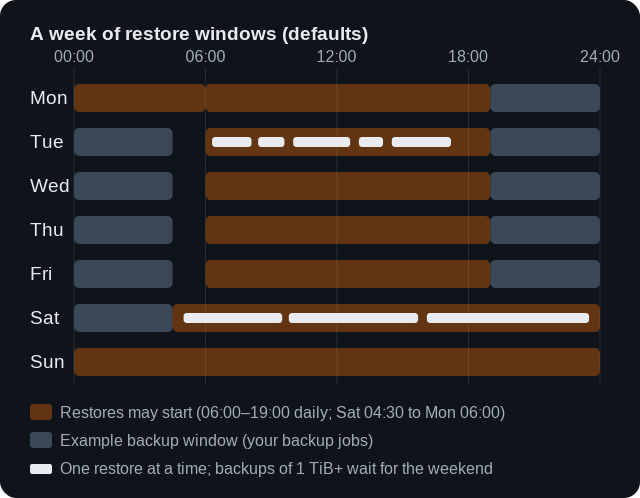
AutoRPO tests continuously, one restore at a time, in the gaps between your backups. By default a restore can start any day from 06:00 to 19:00, and any time from Saturday 04:30 to Monday 06:00, and only if it’s expected to finish before your next backup run. You set the windows to match your backups, so tests run at whatever time of day those gaps fall. The largest backups wait for the weekend window.
Each tier sets the longest a VM may go without a passing test: by default Critical 30 days, Important 90 and Standard 180, and you can change them. Failures are retested promptly, and untested and overdue VMs come next.
Do I need new hardware?
Often not. AutoRPO is designed to run on a spare or retired server, or a VM with nested virtualisation on hardware you already have. What matters most is test-copy storage for your largest VM or restore group plus 100 GiB, and memory to boot it plus 8 GiB for the host. The host is only busy while it restores and checks one VM or restore group at a time.
How long a full round takes. Restore time is mostly backup size divided by network speed. As a rough guide, at 1 Gbit/s a 100 GB VM takes about 15 minutes to restore, plus a few minutes to boot and check. So 80 VMs of that size need roughly a day of restore time, spread over a few days. Treat these figures as estimates: AutoRPO measures your real restore speed and plans its windows from it.
Running it in the cloud. If you’d rather not keep a server for it, rent one: a dedicated server, or a cloud server or VPS that offers nested virtualisation, runs Proxmox VE and AutoRPO together. Put it close to your Proxmox Backup Server, because every test reads the whole backup: in the same data centre as a hosted PBS, or on a fast link to yours. Test copies of your VMs then exist on that server while they’re checked, so if your backups must never leave your premises, run AutoRPO on site instead.
Network
| From | To | Port | For | Needed |
|---|---|---|---|---|
| Restore host | Proxmox Backup Server | TCP 8007 | Read backups | Required |
| Restore host | Windows file share | TCP 445 (SMB) | Read Hyper-V backups and exports, read-only | Only for Hyper-V |
| Your browser | Restore host | TCP 8443 (HTTPS) | AutoRPO's web interface (port can be changed) | Required |
| Your browser | Restore host | TCP 8006 (HTTPS) | Proxmox console, to look at a test copy before signing it off | Required |
| Restore host | apt.autorpo.com | TCP 443 | Install and updates | Or copy the package across |
| Restore host | licence.autorpo.com | TCP 443 | Daily licence check-in | Or activate offline |
| Restore host | Your mail server or webhook | As configured | Alerts | Optional |
| Restore host | Your S3-compatible storage | TCP 443 | Daily offsite copy of AutoRPO's backups and reports | Optional |
| Restore host | A time-stamping service you choose | TCP 80 or 443 | Timestamps on Restore Evidence Reports (only the PDF's hash is sent) | Optional |
No inbound connections. Test copies can’t reach your network or the internet. Each restore reads the whole backup from PBS, so it uses network bandwidth while it runs. Air-gapped sites install from a copied package and activate offline. See Trust.
What can be tested
- VMs and LXC containers backed up to PBS
- Linux and Windows guests
- Encrypted backups, once the key is uploaded
- Backups from any cluster or standalone host
For checks inside the VM
- QEMU guest agent installed and enabled in the VM
- Without it, only outside checks run: the restore, the boot, console screenshots and signs of life on the network
- Database checks sign in with the copy’s own local account; no database passwords are stored
Not supported
- Running on a node of a Proxmox VE cluster (test from a standalone host instead; the backups can come from any cluster)
- Proxmox VE 8 or earlier as the restore host
- Proxmox backups that aren't on Proxmox Backup Server (vzdump files on NFS or SMB); Hyper-V backups on a share are supported
- ARM hosts
Not sure about your setup? Ask us, or install it and run the host check with a free trial or the Community edition.