
For MSPs: Hyper-V (Windows Server Backup) and Proxmox
Successful backups ≠ successful restores.
Restore testing you can bill for.
A signed report for every client, every month, under your brand.
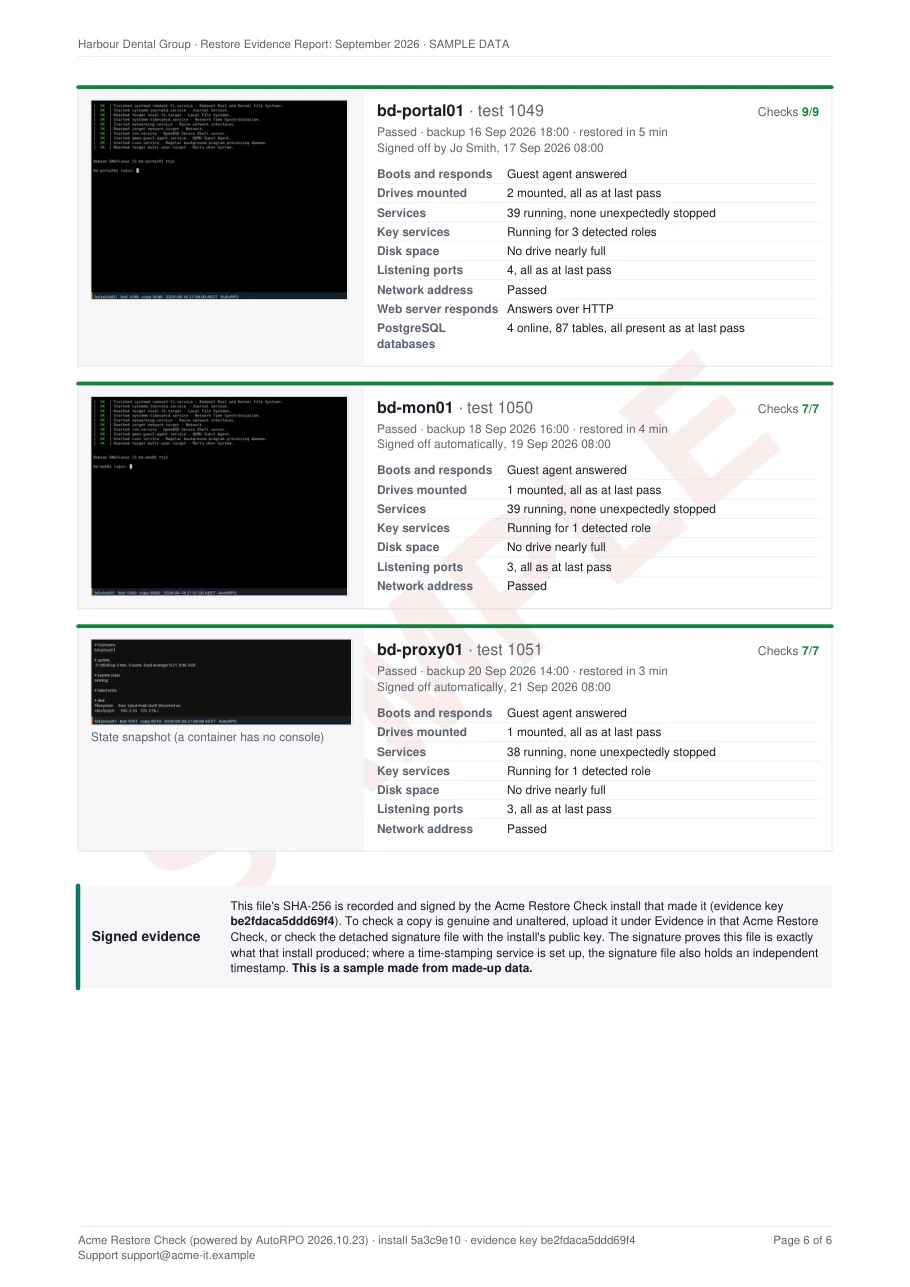
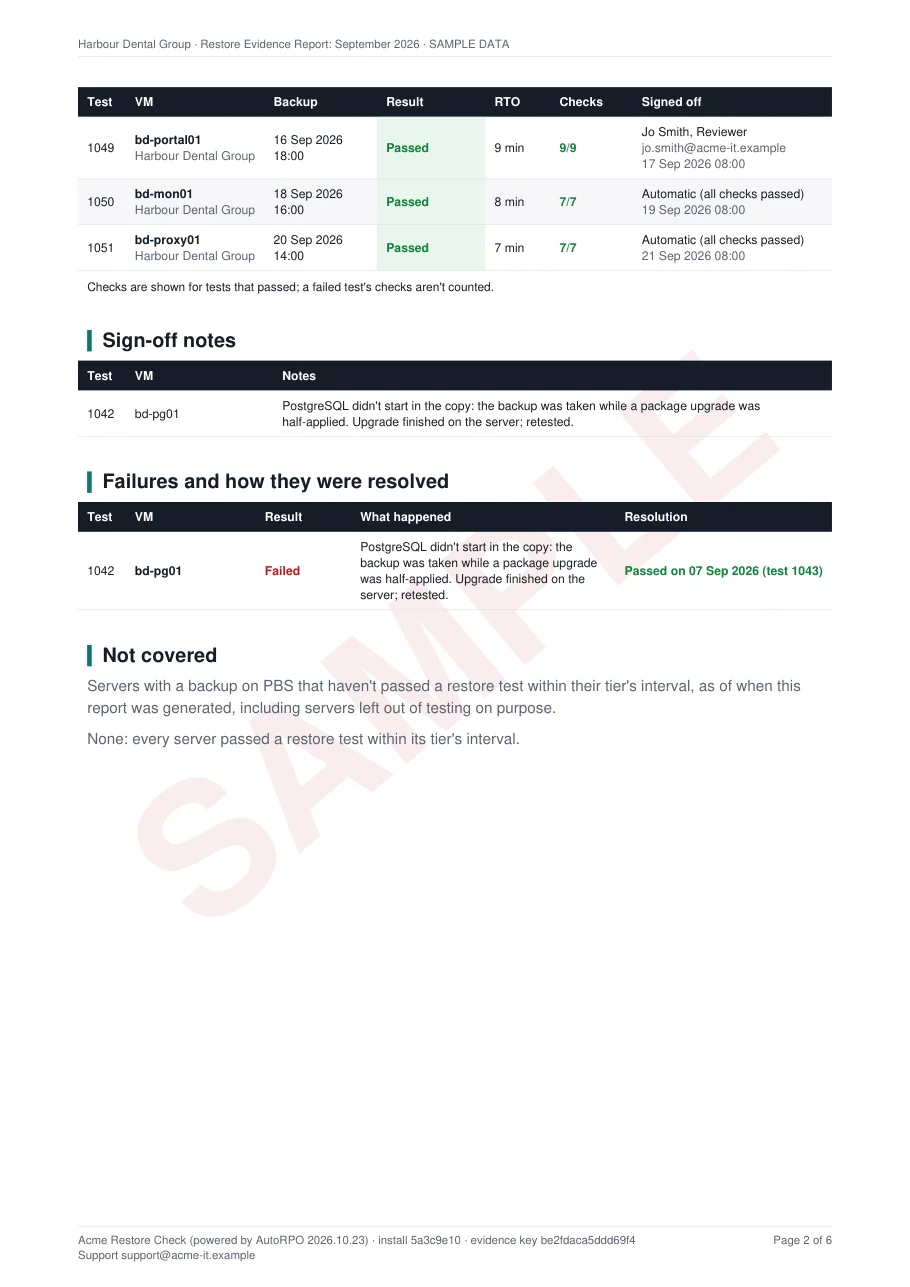
Your logo, their name, every month. See the sample report
What your clients get
In the words a practice manager, partner or owner would use:
“Would we get our systems back, and how fast?”
Every VM is restored, booted and checked on a schedule, and each restore is timed against their recovery target.
“Yes, we test restores.”
They can tick it on the insurance form and attach the signed monthly report as evidence.
“Something to show the board.”
A dated report the board or auditor can read without understanding the technology.
What it does for your business
A dated record that you tested
When a backup that said “Success” won't boot, you have a signed, dated record that you checked it, and when you found out.
A service you can bill for
You pay a predictable monthly amount for each client site and set what the client pays, so restore testing becomes a fixed-price line on every contract.
Follow-on work
A failed test is a fix you can quote for. A restore that runs past its recovery target starts a disaster recovery conversation.
A service clients can see
Backups are invisible until something breaks. A branded report every month shows the work you do.
A slide for every QBR
Coverage, failures, fixes and recovery times for the quarter, straight from the report. And a sample to show in competitive bids.
Less technician time
A restore drill that takes an hour or so by hand, and so gets skipped, becomes a sign-off that typically takes a few minutes. Passing tests can even be signed off automatically, if you choose.
How you might package it
Most MSPs won’t sell it on its own. Put it inside a backup or compliance tier under your own name, such as “Verified Backup” or “Recovery Assurance”, with a one-off setup fee that covers the restore host and the guest-agent rollout. How to sell restore testing as a managed service.
How it fits together
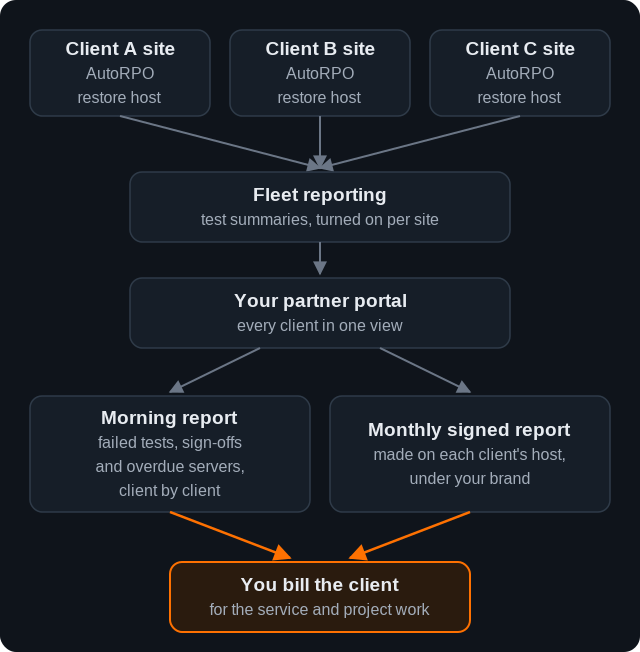
Each client site runs its own AutoRPO. Their results come to your partner account, and you get the work and the reports to bill for.
Billing you can predict, margins that grow
Built for how MSPs sell: a fixed price per client on your side, a fixed price per client on theirs.
Know every bill in advance
You pay for the client sites you look after. Not per VM and not per test, so a client adding servers or AutoRPO testing more often never changes what you pay.
Every client earns you more
Your cost per site goes down as you add client sites. Sell at the same price to every client and your margin on each new one is better than the last.
No lock-in
Month to month: add clients, retire them or cancel in any month. Your clients' test history stays on their own hosts.
The report your clients get
Every month, under your brand: what was tested, what failed and how it was fixed, how long each server took to come back, and a plain-English summary for the owner.
A signed Restore Evidence Report every month
- Which VMs were tested, when, and whether they passed
- What failed, and how it was fixed
- Which VMs weren’t tested, and why
- How old each backup was, and how long the restore and boot took
- A screenshot of each VM as it started up (for a container, a snapshot of its state)
- A digital signature: anyone can confirm it’s exactly the file your AutoRPO produced, with its signature file or by uploading it to your AutoRPO
Download an MSP sample report (PDF) (an MSP-branded sample for a made-up dental practice's Proxmox servers, 6 pages)
It’s produced on your own host, not in the cloud. How the report works.
Partner pricing
Partner prices are private to partners. You'll find them on the Partner plan page of your account once you're approved, with your clients and your invoices.
- One predictable monthly bill for the client sites you look after
- Every VM and every feature included at each client
- Your cost per site goes down as you add client sites
- Site licences are yours: move one to another client’s site at no cost
- A free 25-VM not-for-resale licence for your own lab and demos
- Month to month: change plan or cancel any month
Site licences are a paid service: if you stop paying, client sites drop to the Community edition’s limits (25 VMs, no RPO/RTO or evidence reports) 24 hours after the paid month ends, unless you resume your plan.
Your brand, your client relationship
Put your own name, logo, colour and support details on the app, the alerts and the monthly Restore Evidence Reports. Your clients deal with you; AutoRPO appears in the footer and on the admin licence pages.
Every client in one view
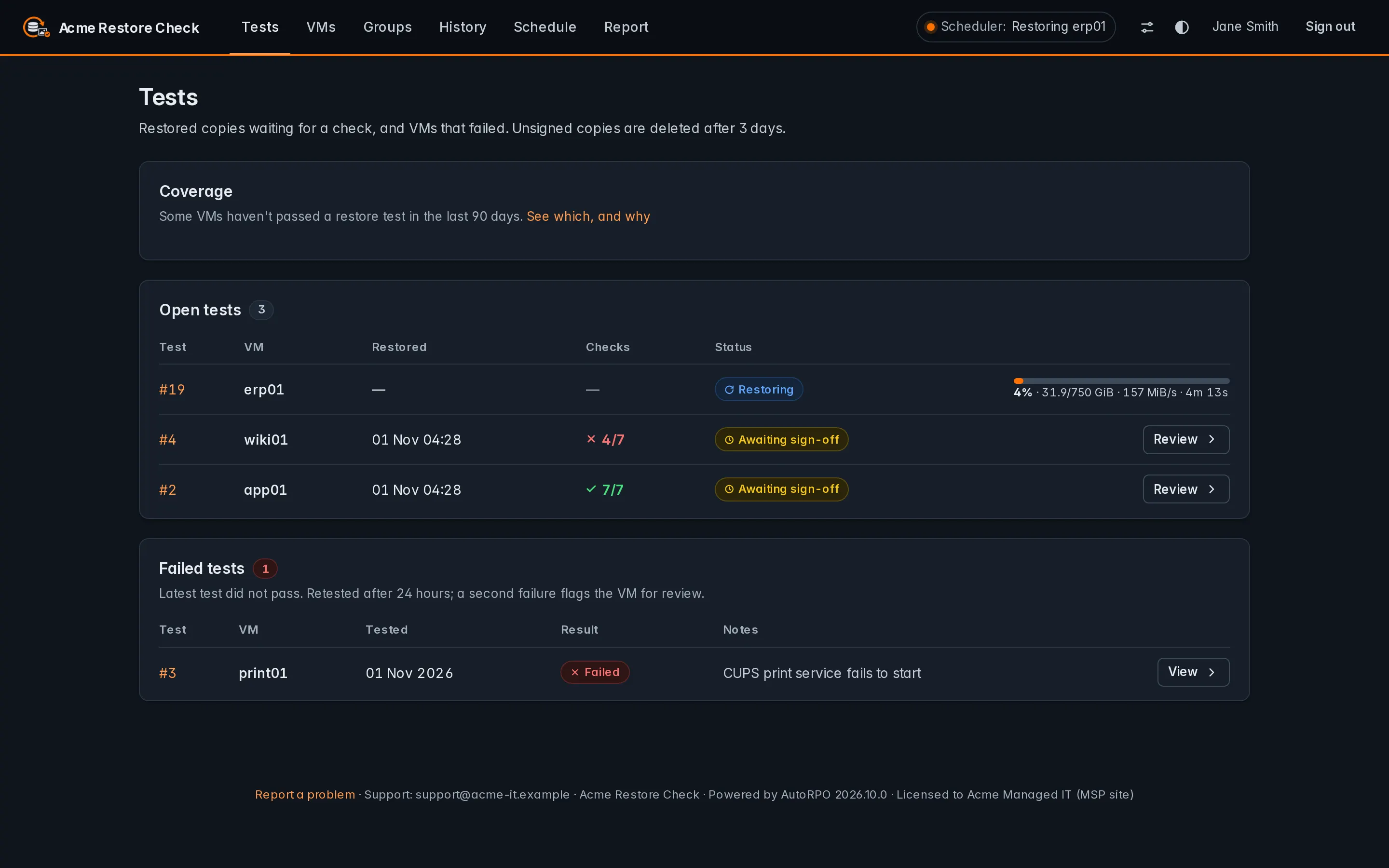
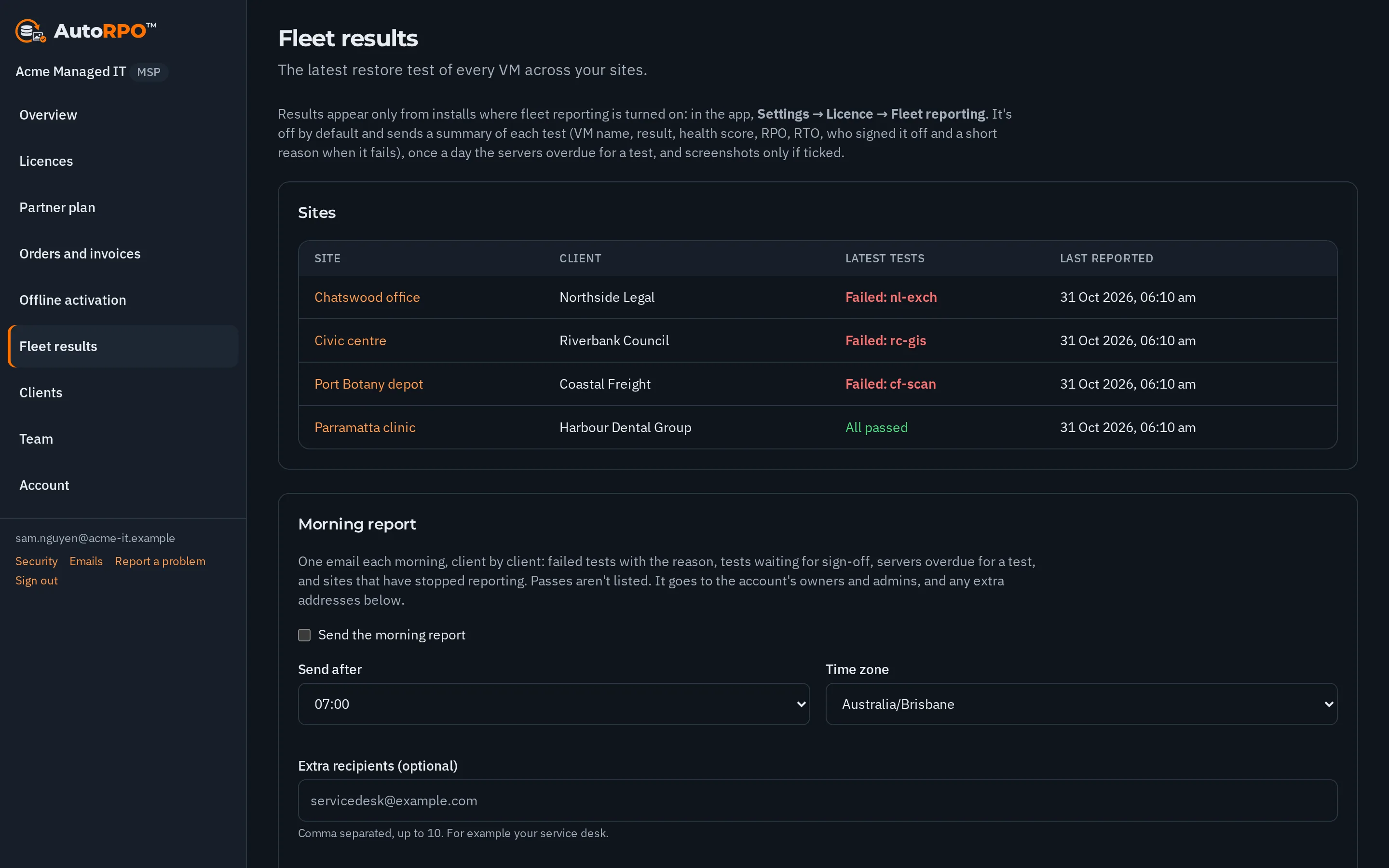
See which client sites passed and which need attention, all in your partner account, and get a morning report by email: client by client, the failed tests, tests waiting for sign-off and servers overdue for a test. Each site sends a short summary of its tests, with a screenshot if you choose. It's off until you turn it on for a site. Exactly what it sends.
What each client site needs
One small restore host per site, a one-off setup, then a few minutes a test.
Restore host sizing
| Proxmox VE | 9, standalone (not in a cluster) |
|---|---|
| Memory | The largest VM's memory (or the largest restore group's, all together) plus the 8 GiB AutoRPO keeps free by default (16 GiB or more recommended; 8 GiB hosts must lower that reserve) |
| Storage | The largest VM's disks (or the largest restore group's) plus 100 GiB (the default reserve); SSD preferred |
| CPU | 4 cores or more, with virtualisation turned on |
| Network | 1 Gbit/s to the backups at least; each test reads the whole backup |
Three ways to provide it
- A small dedicated box. Hardware you buy once and leave at the site. The simplest to support.
- A nested VM on the client’s existing host. No new hardware, but it uses that host’s spare memory and storage while it tests, and test copies boot more slowly.
- A cloud server. A monthly bill instead of hardware. Put it near the backups, because every test reads the whole backup.
Setup, once per site
Build the restore host, then install AutoRPO: setup takes about 30 minutes and starts the first real restore test straight away.
Hyper-V sites: the guest agent
A one-off RMM job: push the VirtIO guest tools (Windows) or qemu-guest-agent (Linux) to each VM before its next backup, so AutoRPO can check inside the copies.
Each month
Sign-off only: a few minutes a test. If you choose, tests whose checks all passed are signed off automatically, marked as automatic in reports.
Keys and sites in one account
Add a site in your partner account, pick its client, and activate that site's install with its key. Retire a site and its key is free for another client.
Results in one view
Turn on fleet reporting per site to see every client's tests in your account, and a morning report of what needs fixing. Alerts go to each client's ticket queue, and each install's read-only API can feed your RMM or PSA.
Your clients don't need accounts
You hold the licences and run the service, your clients get the reports under your brand, and you decide what they pay. Each install updates through apt, and an update never interrupts a restore.
Backups stay at the site
Each site's AutoRPO reads that site's backups read-only. The backups never come to us.
Getting started
- 1
Apply
Sign up as a partner. We approve partner accounts by hand, usually within two business days.
- 2
Set up your lab
Your free 25-VM not-for-resale licence arrives on approval. Try AutoRPO on your own backups first.
- 3
See your pricing
Your partner pricing appears on the Partner plan page of your account once you're approved. Add each client in your account.
- 4
Install at each client
Install AutoRPO on a Proxmox host at each site, activate it with that site's key, and switch on reporting to your account.
Partner questions
What happens when a client leaves?
What does it cost?
Are we billed per VM or per test?
Is there a lock-in?
What if we cancel?
What does fleet reporting send?
What's in the morning report?
Most of our clients are small Windows sites on Hyper-V. Does it work for them?
Do we need new hardware at every client site?
Is it safe to run nested on a client's production host?
How do we roll out the guest agent to Hyper-V VMs?
It tests the newest backup. What about older restore points?
Does it work with other backup software?
Can MSPs in Europe join?
Do our clients need an AutoRPO account?
Make restore testing a service you bill for
Predictable monthly billing per client site, margins that grow with you, and your own 25-VM lab licence free.