
Restore testing evidence for ISO 27001, SOC 2, Essential Eight, APRA and NIST
Most security standards expect backups to be tested, and records that show it. AutoRPO restore-tests your Proxmox and Hyper-V backups on a schedule and keeps the evidence. This page lists, standard by standard, the evidence it holds.
Evidence by standard #
| Standard | What it asks | Evidence AutoRPO holds |
|---|---|---|
| ISO/IEC 27001:2022, Annex A 8.13 | Backups regularly tested, in line with your backup policy | A dated record of every restore test, and test intervals by tier |
| SOC 2, A1.2, A1.3, CC7.5 | Recovery procedures and backup data tested periodically | A signed Restore Evidence Report for every month, failures and fixes included |
| ASD Essential Eight, Regular backups and ISM-1515 | Restoring data, applications and settings to a common point in time, tested | Whole servers restored and checked inside; restore group runs for multi-server systems |
| APRA CPS 234, paragraph 27 | Security controls tested in a systematic program | Dated results, named reviewers, failures and follow-up |
| APRA CPS 230, business continuity | Recovery of critical operations within tolerance levels | Measured restore time and backup age for every test |
| NIST CSF 2.0, PR.DS-11 | Backups created, protected, maintained and tested | Test history, and servers not tested, with the reason |
| NIST SP 800-53, CP-9(1) | Backups tested at a frequency you set | Test intervals by tier, and a dated record for each test |
| Cyber insurance | "Do you test restoring from backups?" | Dates, results and the monthly report |
What AutoRPO does in each test #
Restores the backup onto your restore host, on a network with no way out. Starts the copy and, at the level you choose, checks inside it: services, drives, listening ports and server roles, plus your own script if you add one. Takes a console screenshot. Waits for sign-off, by a person or automatically if you turn that on, then deletes the copy.
The evidence it holds #
For every test
- which backup, its age, and when it was restored;
- how long the restore and boot took;
- each check and its result, and the console screenshot;
- who signed it off, with their role and notes, or that it was signed off automatically;
- for a failure: what failed, the notes, and the retest.
Every month
- a Restore Evidence Report (PDF) of all the month's tests, failures and how they were resolved, and any server not tested, with the reason;
- signed by your install, and optionally timestamped by a time-stamping service, so anyone can check it hasn't been changed.
Always
- the full test history, never pruned, with no way to delete a test in AutoRPO;
- an audit log of sign-ins, sign-offs and settings changes, chained so a change shows, and exportable;
- restore group runs and their results.
Download a sample Restore Evidence Report (9 pages, from demo data).
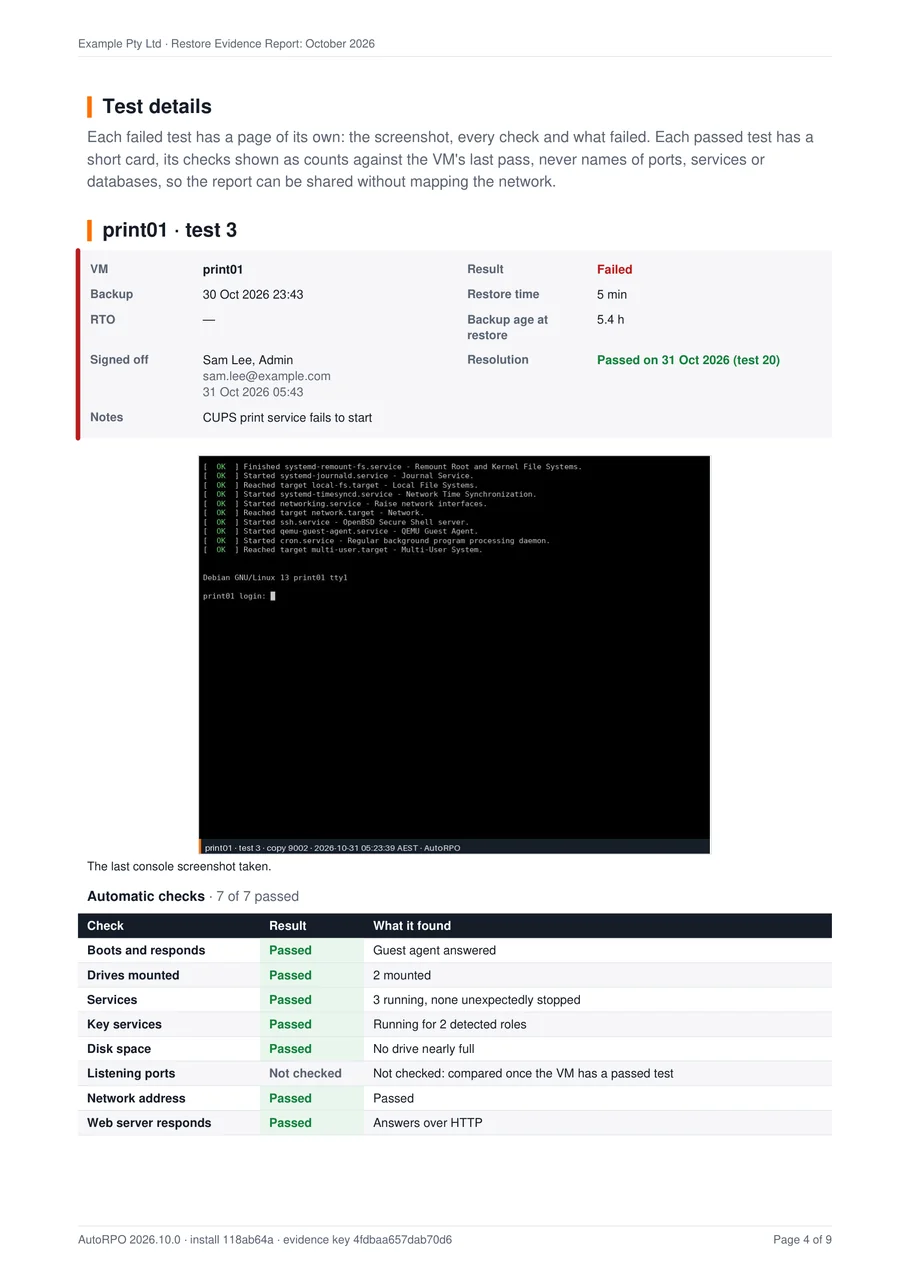 A failed test's page in a monthly Restore Evidence Report
Checking a report #
Upload a report under Report → Restore Evidence Reports → Check a PDF and AutoRPO says whether that install made exactly that file. Without AutoRPO, the signature file next to the PDF can be checked with a few lines of Python; the steps are in Reports and the Restore Evidence Report.
A valid signature proves the report came from that install and hasn't changed. It doesn't prove the results are true, because the key is on your own host. Proxmox's own task logs, which AutoRPO doesn't control, show each restore and each test copy, so the report can be checked against them.
AutoRPO supports your evidence; it doesn't make you compliant by itself. This page is general information, not legal or audit advice. Standards change, so check the current version of each one.