
Reports and the Restore Evidence Report
Reports #
Report shows, for any period and optionally one client:
- Coverage: which VMs passed within their tier's interval, and every VM not covered, with why.
- RPO: how old the backup was when it was tested, against each tier's target.
- RTO: measured restore and boot time, against each tier's target.
- Every test with its result, checks passed and sign-off.
The monthly Restore Evidence Report #
Under Report → Restore Evidence Reports, AutoRPO makes one Restore Evidence Report (a PDF) per month, automatically once the month has ended and its tests are closed, and on request for the month so far. A report for a month that hasn't ended, or with tests still open, is a draft: it says so on every page, in a box on page 1 and in its file name. Each report has:
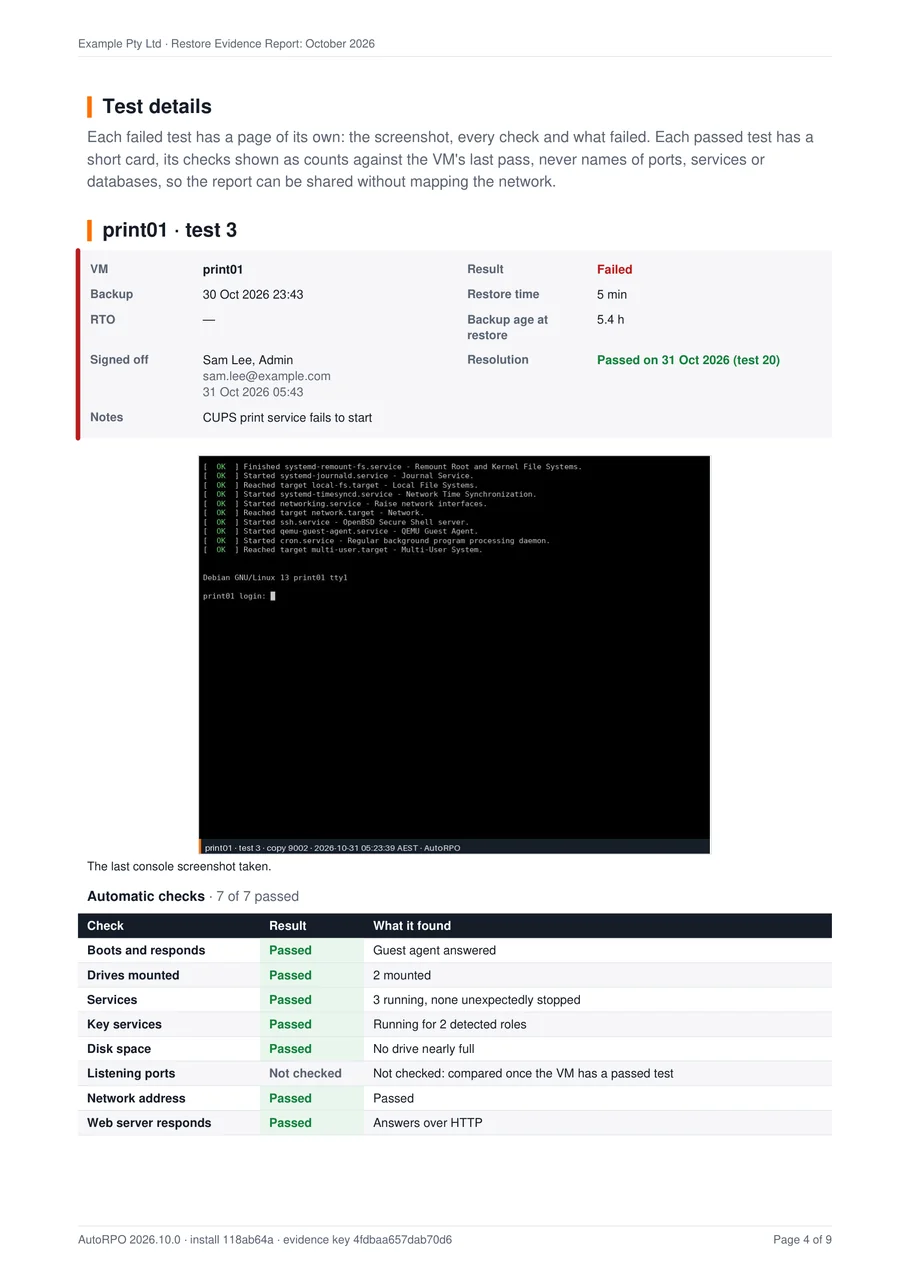 A failed test's page in a monthly Restore Evidence Report
Download the full sample report (PDF, 9 pages, from demo data).
- a plain-English summary of the month;
- how testing works on this install (isolation, checks, sign-off);
- every test with result, RTO, checks passed and sign-off, and the sign-off notes;
- failures and how they were resolved;
- for each restore group, the service recovery time of its latest passed run, against the group's RTO target;
- every VM that wasn't covered, with why;
- a full page for each failed test, and a short card with a small boot screenshot for each passed test. Under Settings → Testing → Sign-off and evidence you can limit the cards to your first tier or turn them off; every test is still listed.
PDFs are made on your host. Nothing is sent anywhere.
Each restore group run also has its own PDF record, on the run's page. It's kept apart from the Restore Evidence Report and doesn't change any VM's coverage, RPO or RTO.
Signed, so they can be checked later #
Each PDF's SHA-256 hash is signed with the install's own Ed25519 evidence key, and recorded in the audit log. There are two ways to check a copy someone hands you:
In AutoRPO. Upload the file under Report → Restore Evidence Reports → Check a PDF. AutoRPO says whether this install made exactly that file.
Without AutoRPO. Download the detached signature (<file>.sig.json) next to the PDF. It holds the file
name, the SHA-256, the signature, the algorithm (Ed25519) and the install's public key. The signature is
over the SHA-256 hex string of the file. With Python and the cryptography package:
import base64, hashlib, json
from cryptography.hazmat.primitives.asymmetric.ed25519 import Ed25519PublicKey

sig = json.load(open("evidence-2026-10.pdf.sig.json"))
digest = hashlib.sha256(open("evidence-2026-10.pdf", "rb").read()).hexdigest()
assert digest == sig["sha256"], "the file was changed"
key = Ed25519PublicKey.from_public_bytes(base64.b64decode(sig["public_key"]))
key.verify(base64.b64decode(sig["signature"]), digest.encode())  # raises if the signature is wrong
print("valid")
Keep a copy of the install's public key from a time you trust (it's on the Evidence page), so a later signature file can't swap in a different key. The evidence key is included in AutoRPO's own backups, so a rebuilt host keeps the same key.
Timestamps from a time-stamping authority #
Under Settings → Testing → Sign-off and evidence you can set an RFC 3161 time-stamping service, for example
http://timestamp.digicert.com. When AutoRPO makes a PDF it sends the PDF's SHA-256, and nothing else, to that
service, and keeps its signed timestamp in the signature file. The timestamp proves the PDF existed at that time,
so a report can't be backdated, not even by the install that made it. If the service can't be reached, the PDF
is still made and signed, and Timestamp on the Evidence page adds the timestamp later.
To check a timestamp, base64-decode timestamp.rfc3161_response from the signature file into evidence.tsr,
then:
openssl ts -verify -in evidence.tsr -digest <the PDF's sha256> -CAfile <the service's CA certificates>
What the signature proves, and what it doesn't #
A valid signature proves that this install produced exactly this file, and that nobody has changed it since. It doesn't prove the results are true. The key is on the customer's own host, so someone with root on that host could, in principle, change the database and sign a new PDF.
A timestamp from a time-stamping authority (above) adds independent proof of when the PDF was made. An auditor who needs more than the PDF can check it against records AutoRPO doesn't control:
- Proxmox Backup Server's task log shows each restore reading the backup, with its time and the
token AutoRPO uses (
autorpo@pbsif AutoRPO created it). - The restore host's Proxmox task log shows each test copy being created, started and destroyed.
- AutoRPO's audit log (below) lists every sign-off with who did it and when.
- Keep the public key from day one. A PDF signed by a different key wasn't made by the install you first saw.
The audit log #
Sign-ins, sign-offs and settings changes are recorded in a tamper-evident audit log. Settings → Audit log shows it and warns if anything was changed or removed. Admins can export it as CSV with each entry's hash, so it can be checked outside AutoRPO.
Each sign-off records the signed-in user who made it. Give every reviewer their own account, so the report names a person, not a shared mailbox.
How long records are kept #
Test results, sign-offs, Restore Evidence Reports and the audit log stay on the host until you remove them. There's no way to delete a test in the interface, and AutoRPO never prunes its own history. Test copies are deleted after sign-off, or after 3 days if nobody signs them off. AutoRPO's own nightly backups (Settings → Maintenance) keep your history safe if the host fails.
Which controls it helps with #
AutoRPO produces evidence that restores are tested. It doesn't make you compliant by itself, and your auditor decides what they accept. These are the controls it's most often used for (more on the compliance page):
| Framework | Control | What AutoRPO gives you |
|---|---|---|
| ISO/IEC 27001:2022 | A.8.13 Information backup | Regular restore tests of each backup, with results and sign-off |
| SOC 2 | A1.2 and A1.3 (availability: backup and recovery testing) | Monthly signed evidence that recovery works, including failures and fixes |
| ASD Essential Eight | Regular backups: restoration tested | Each VM restored and checked on a schedule, by tier |
| NIST CSF 2.0 | PR.DS-11 (backups are created, protected, maintained and tested) | Test history, coverage and untested VMs with reasons |
| Cyber insurance questionnaires | "Do you test restoring from backups?" | Dates, results and a signed monthly Restore Evidence Report |
Alerts and the JSON API are covered in Notifications and the API.