
Licensing
The Community edition is free for up to 25 VMs, for non-commercial use: home labs, learning and personal projects. It restore-tests and checks your VMs and sends alerts, but doesn't include RPO/RTO tracking or Restore Evidence Reports. For business use you need a licence (or a trial):
| Edition | VMs in automatic testing |
|---|---|
| Community | 25 (no key needed, or register a free Community licence in your account; non-commercial use) |
| Starter | 30 |
| Pro | 100 |
| Business | 500 |
| Enterprise | 1,500 (larger estates by quote) |
Licences are perpetual and every paid edition has every feature. A VM means a VM or container included in automatic testing; VMs marked "Don't test" don't count. A licence activates one AutoRPO install for every 500 VMs of its limit, rounded up, and each install tests up to 500 VMs: Starter, Pro and Business cover one install, Enterprise covers three. See Pricing.
Updates, support and the version rule #
A licence is a one-off purchase. Two things are optional, and you choose each separately:
- Updates: new versions, compatibility with new Proxmox releases and security fixes. The first 12 months are included with every licence. After that, updates cost 10% of the edition's price a year. Renewing adds 12 months to your updates date, or 12 months from the payment date if it had lapsed.
- Support plan: help through the portal from the people who build AutoRPO, with a reply within 2 business days, for 15% of the edition's price a year. Support covers current versions, so it needs current updates; buying support renews updates too if they would run out first.
A licence covers every major version of AutoRPO that started on or before its updates date, with every release
of it. Major versions are yearly (2027, 2028…). Versions your licence doesn't cover are kept off the host:
AutoRPO pins them in apt (/etc/apt/preferences.d/autorpo-licence) so apt upgrade passes them by, and the
package itself refuses to install one. apt upgrade also stays within your installed major; moving to a newer
major is your choice, under Settings → Maintenance. If you install an uncovered version anyway, it won't run
tests and the Licence page says why, until you renew or go back to an earlier version. Renewing lifts the pins at
the next update check. Your licence never stops working on the versions it covers.
Security fixes are released for the current and the previous major version. Every release of a major your licence covers works with it, whether or not your updates are current.
Activate online #
- Buy a licence (or start a trial) in your AutoRPO account.
- In AutoRPO, open Settings → Licence and enter the key (
ARPO-XXXXX-XXXXX-XXXXX-XXXXX). - AutoRPO contacts
licence.autorpo.com, and the edition applies straight away.
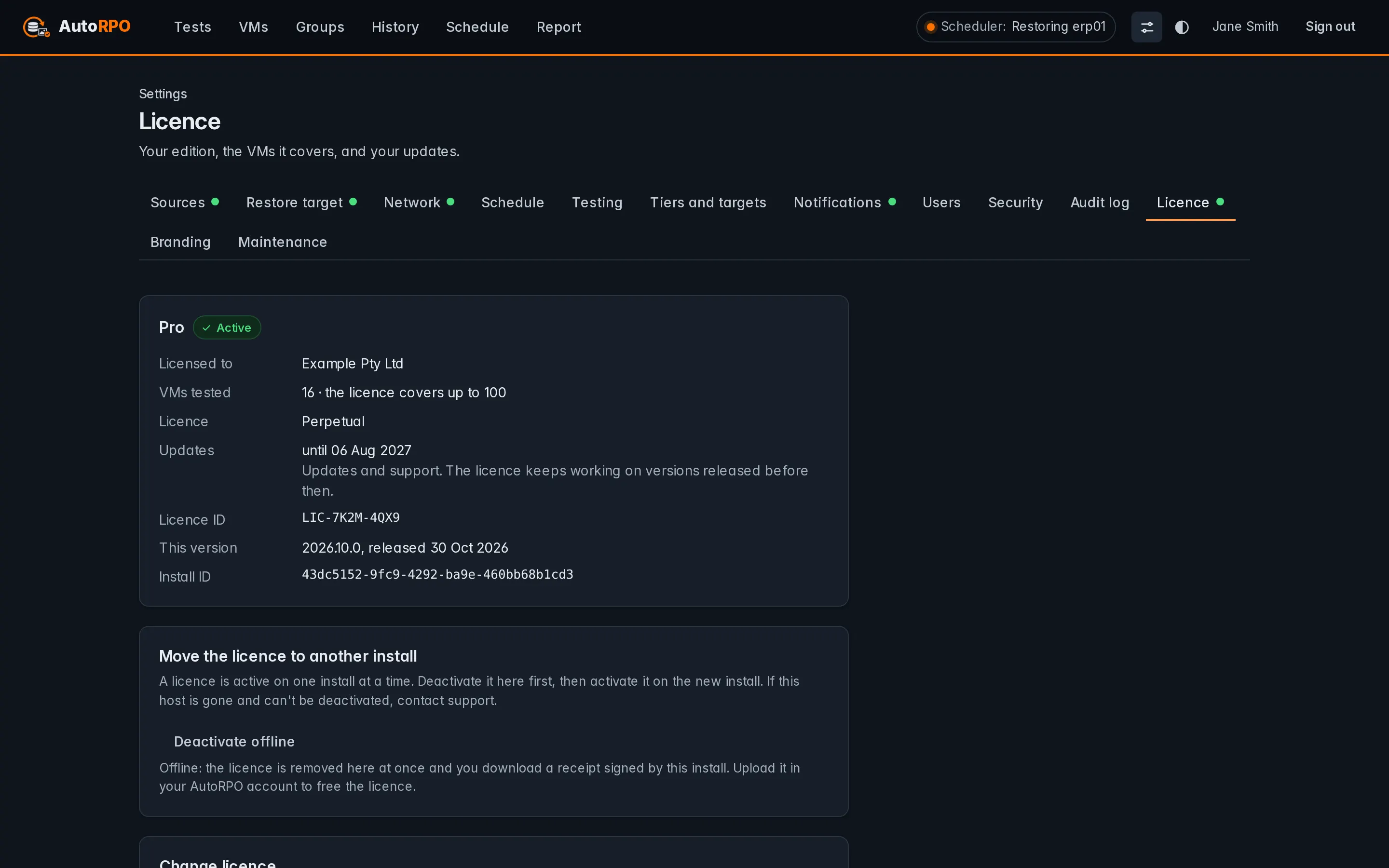 Settings → Licence
The install then checks in once a day. The check-in picks up renewals and upgrades; a failed check-in never changes your edition. Only a signed notice from the licence server (the licence was moved by support, refunded or revoked) removes a licence. Check now on the Licence page checks in straight away.
See What AutoRPO sends home for exactly what a check-in contains.
Activate offline (air-gapped sites) #
- On the Licence page, enter the key and choose Download activation request. The file holds the key, the install ID, the AutoRPO version, the VM count, the install's public key, and which versions of the terms were accepted at setup, and when.
- On any connected computer, sign in to your AutoRPO account and upload the request. Download the licence file it gives you.
- Back on the Licence page, import the licence file.
For a renewal or upgrade, download a fresh licence file for the same install from your account and import it.
Move a licence to another install #
A licence is active on one install at a time. To move it:
- Online: on the old install, Settings → Licence → Deactivate. Then activate the new install with the same key.
- Offline: on the old install, Deactivate offline. It removes the licence and downloads a receipt signed by that install. Upload the receipt in your account to free the licence.
Transfers are free and unlimited; each one is logged in your account.
If the old host is gone and can't deactivate itself, contact support and we'll free the licence. The old install learns at its next check-in.
Trials #
A 30-day trial has the Business edition's limit (500 VMs), for evaluation only. One trial per organisation and per install: an install that has had a trial can't start another. After the trial, the install runs as the Community edition unless you buy a licence; buying the trial licence keeps the same key.
Over the limit #
If more VMs are in testing than the licence allows, the highest-priority VMs are tested (your first tier first) and the rest show Over licence limit. Nothing stops and nothing is deleted. A restore group whose required VMs are over the limit doesn't run.