
PBS sources and read-only tokens
AutoRPO reads backups from any number of Proxmox Backup Servers (PBS 3 or 4). It only ever reads from PBS: it never prunes, deletes or writes backups.
Open Settings → Sources (setup step 4).
Two ways to add a source #
Adopt a PBS storage already on the host. If the Proxmox host already has PBS storages in
storage.cfg, they are listed. Adopt one with a click: AutoRPO uses it as it is and never changes it.
A storage that signs in with more than read access (for example as root@pam) can't be adopted; add the
server with a read-only token instead. Adopting is available once setup is finished; during setup, add the
server with a token.
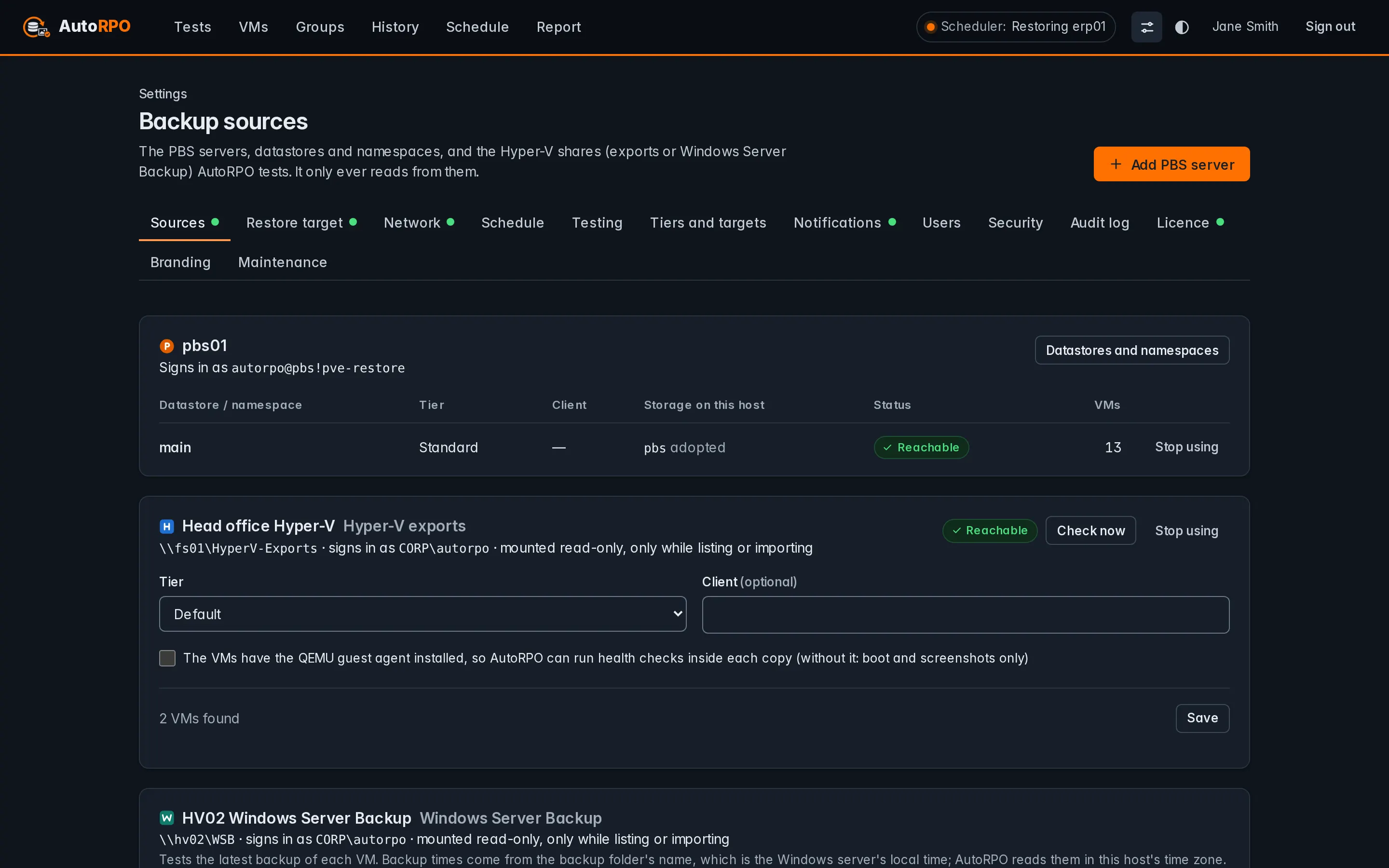 Settings → Sources
Add a new PBS server.
- Enter the host name and port (8007). AutoRPO shows the server's SHA-256 certificate fingerprint: compare it with the fingerprint on the PBS dashboard before you continue. AutoRPO trusts only this certificate from then on.
- Give AutoRPO credentials, one of:
- I have a token (
user@realm!nameand its secret). The page shows the exact PBS commands to create a read-only user, token and permissions. - Create a read-only token for me. Enter a PBS admin login once; AutoRPO creates the
autorpo@pbsuser, a token and read-only permissions (DatastoreReaderon all datastores), then forgets the admin login. To limit it to some datastores, or if the admin account uses two-factor sign-in, create the token yourself instead.
- I have a token (
- Tick the datastores and namespaces to test (the Test column). The tree shows VM counts and the newest backup for each; New sub-namespaces → Include also tests namespaces added later.
- If some backups are encrypted, upload the key file (see below).
- Save.
For each ticked datastore or namespace AutoRPO adds one Proxmox storage entry named arpo-…. The token
secret goes into Proxmox's own secret file (/etc/pve/priv/storage/<id>.pw), never onto a command line.
Removing a server removes only the entries AutoRPO created.
Permissions #
| Need | PBS permission | If it's missing |
|---|---|---|
| List and restore backups | DatastoreReader on /datastore/<store> or /datastore/<store>/<namespace> |
The source can't be used |
| See verify jobs, to pause restores while PBS verifies | Datastore.Verify on /datastore/<store> (the whole datastore, not just a namespace), or Sys.Audit on /system/tasks |
A warning: restores won't wait for verify jobs on that datastore |
PBS tokens need the permission granted to both the token and its user. The permission check on the Sources page shows a row per need, green, amber or red, with the command that fixes anything missing.
Credentials that could change or delete backups are refused, and AutoRPO re-checks this every hour. If a server's access stops being read-only, nothing is restored from it until it's fixed.
Tiers and client labels #
Set a tier on a datastore or namespace and everything below inherits it. You manage your own tiers under Settings → Tiers and targets: add, rename, reorder and delete them, and set each one's test interval and RPO and RTO targets. The order is the priority: higher tiers are tested first, and kept up to date first when there are more VMs than your licence covers. RPO and RTO targets are in the paid editions.
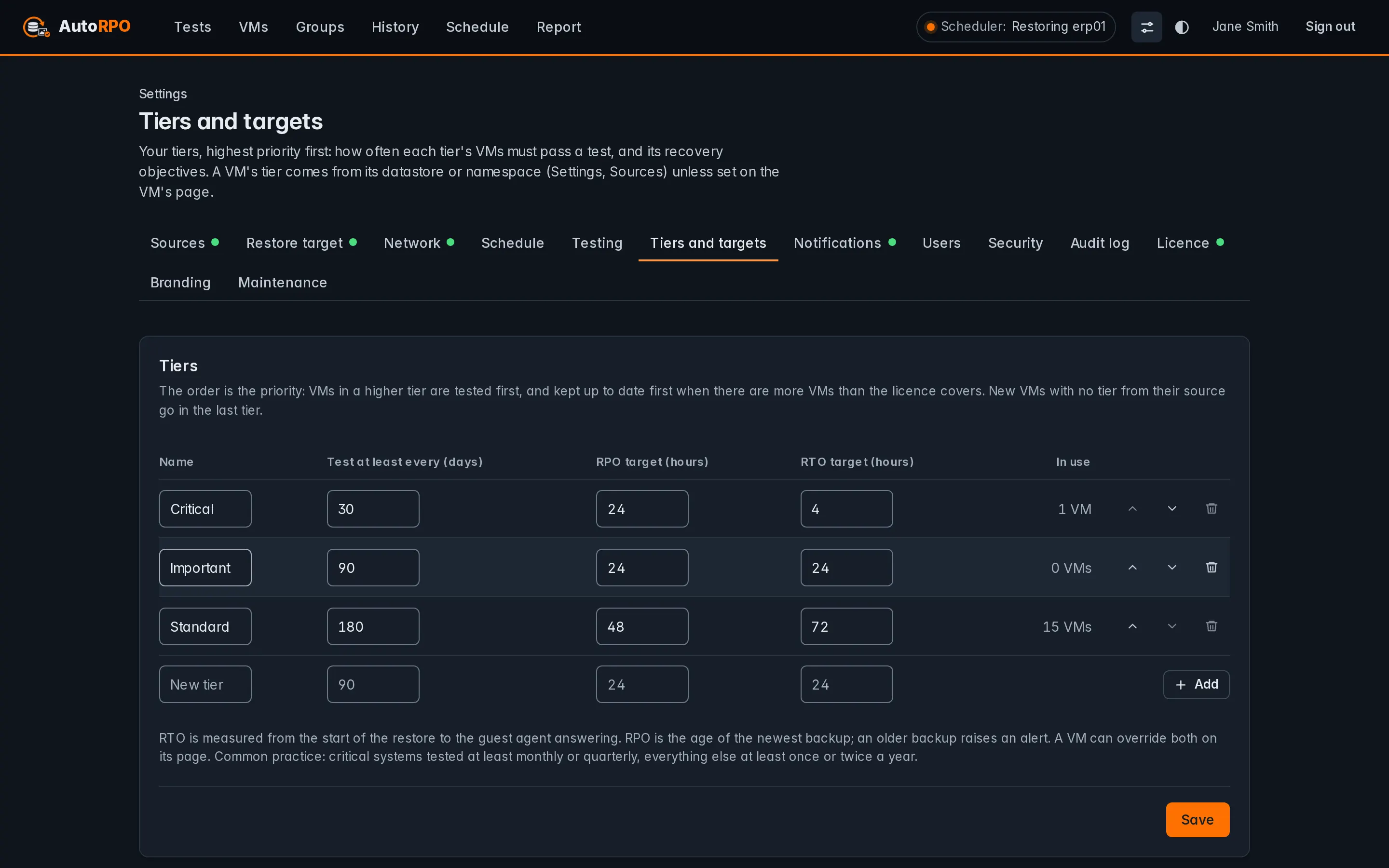 Settings → Tiers and targets
A new install starts with three tiers based on common practice:
| Tier | Tested at least every | RPO target | RTO target |
|---|---|---|---|
| Critical | 30 days | 24 hours | 4 hours |
| Important | 90 days | 24 hours | 24 hours |
| Standard | 180 days | 48 hours | 72 hours |
Don't test keeps a datastore or namespace out of the queue. A VM with no tier from its source goes in the last tier, and a VM can override its tier, and its targets, on its own page. A tier can only be deleted once no VMs or sources use it.
A client label works the same way. Reports, coverage, Restore Evidence Reports and alerts can be filtered by client, which matters if you test backups for several organisations.
Tick New sub-namespaces → Include on a namespace to have new child namespaces picked up at the next inventory refresh.
Encrypted backups #
VMs whose newest backup is encrypted show Can't test: no key until you upload the key, instead of failing. Upload the key file (a proxmox-backup-client key without a passphrase) for the server; AutoRPO checks its fingerprint against the backups, keeps it encrypted, and gives it to every storage it creates for that server.
The same VM in two places #
AutoRPO recognises the same VM across VMIDs, clusters and datastores, so its history follows it. If a VM has recent backups in more than one selected datastore or namespace, the Sources page lists where it's tested from and where else it is. The newest backup is always the one tested.