
Notifications and the API
AutoRPO tells people when something needs attention: a test failed, a VM keeps failing, a backup is too old, or restores can't run. Alerts go to destinations you add under Settings → Notifications. Each destination chooses its own events, so the on-call phone can get only the urgent ones while the team inbox gets everything.
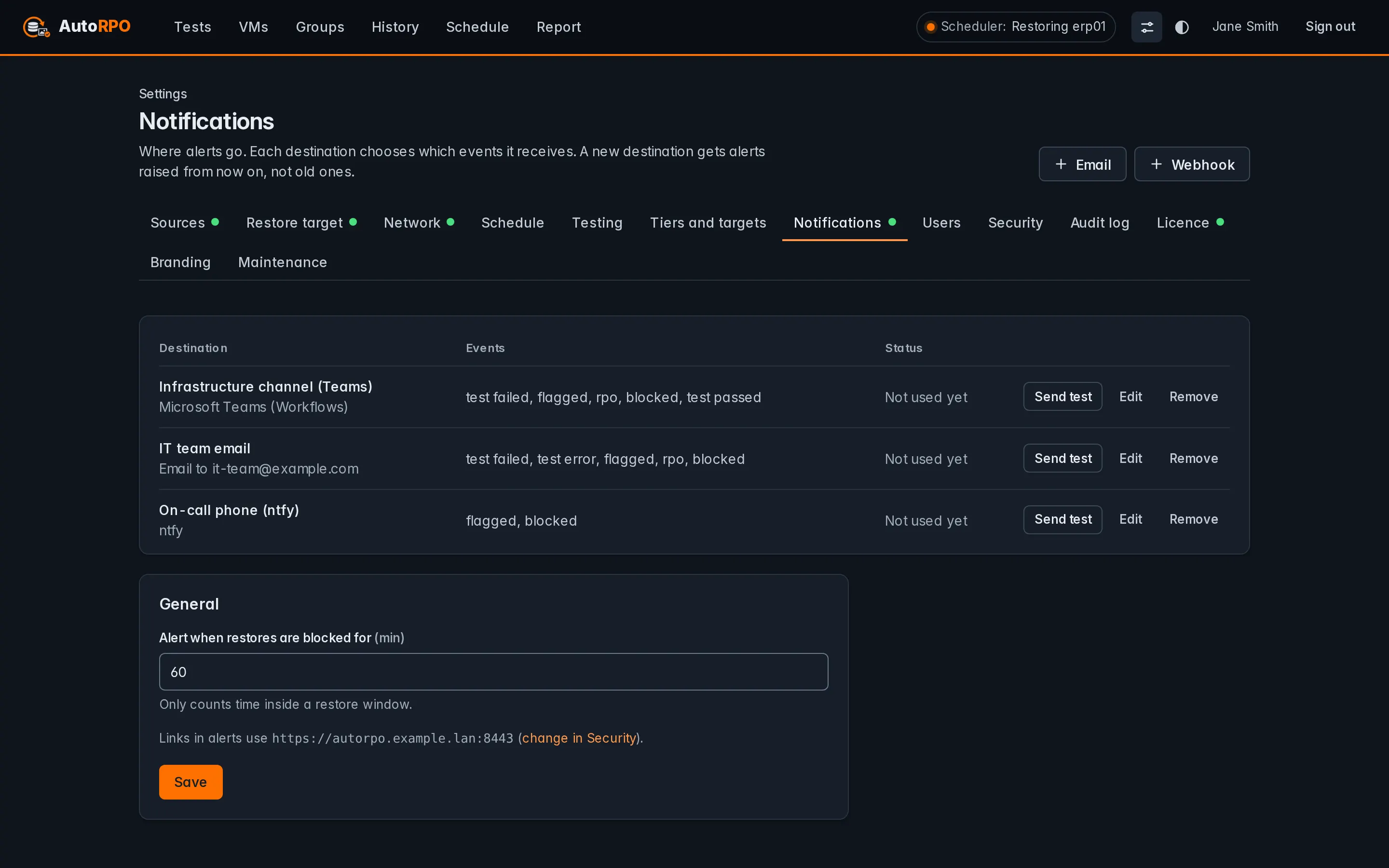 Settings → Notifications: three destinations, each with its own events
Destinations #
| Kind | What you enter | Notes |
|---|---|---|
| Email (SMTP) | SMTP server, port, connection security (STARTTLS, TLS or none), optional username and password, From and To addresses | Works with any provider: Brevo, SendGrid, Mailgun, Microsoft 365, Gmail, Amazon SES or your own server. The password is stored encrypted and never shown again. |
| Email (provider API) | Brevo, SendGrid, Mailgun or Postmark; an API key, From and To addresses (Mailgun also needs the sending domain and US or EU region) | For providers you'd rather use by API key than SMTP. Give the key permission to send email only; it is stored encrypted. |
| Microsoft Teams | The Workflows webhook URL for a channel | Sent as an Adaptive Card with a link back to AutoRPO. |
| Slack | An incoming webhook URL | |
| Discord | A channel webhook URL | |
| ntfy | The topic URL on your ntfy server (or ntfy.sh) | Good for phone push alerts; tapping one opens AutoRPO. |
| JSON | Any HTTPS URL | For RMM, PSA and ticketing tools. See the payload below. |
Alerts show what failed, the facts that matter and a button to open the test. A destination can also include the copy's console screenshot (Teams, Discord, ntfy and email; never Slack or JSON). It's off by default, because the screen can show server names or errors that then go to that service.
Send test on each destination sends a marked sample alert straight away, so you can check it arrives. The Status column shows when the destination last worked, or the error if it didn't. A new destination only gets alerts raised after it was added; it is never flooded with old ones.
Events #
| Event | On by default | When |
|---|---|---|
| A test needs review | Yes | As soon as a test finishes with a failed check, before anyone signs it off; the alert names each failed check. You can also have it for tests with only warnings, and for VMs in a restore group run (the group has its own alert). |
| A test failed | Yes | A person marked a test as failed. |
| A test could not complete | Yes | The restore, boot or checks couldn't run, for example a storage error or a timeout. |
| A VM failed twice and left the queue | Yes | The VM is taken out of testing until someone reviews it. |
| A backup is older than its RPO target | Yes | The newest backup of a VM is older than its tier's RPO target. |
| A test took longer than its RTO target | Yes | From the start of the restore until the guest agent answered took longer than the VM's RTO target (for a VM without the guest agent, until it powered on). Sent once per test. Also sent when a restore group's service took longer than the group's RTO target. |
| Restores are blocked | Yes | No restore could start for longer than the limit you set: 60 minutes by default, counting only time inside a restore window. |
| A restore group run stopped, couldn't start, or expired | Yes | Includes a run that expired without its group sign-off. |
| A restore group run is waiting for its group sign-off | Yes | Every VM in the run is signed off and the group needs a reviewer. |
| The offsite copy failed | Yes | The nightly upload to S3-compatible storage failed. |
| An update was installed automatically, or needs attention | Yes | An automatic update was installed, or one couldn't be (for example a release your licence's updates don't cover), a new major version is out, or security fixes for your version are ending. See Updates. |
| A backup of AutoRPO was downloaded | Yes | The backup holds the key to AutoRPO's saved passwords, so every download is reported. |
| A test passed | No | Useful for a quiet "all good" channel. |
| The monthly Restore Evidence Report is ready | No | When the month's signed report is issued. Email destinations get the PDF and its signature file attached, ready to forward to an auditor or insurer; webhooks get a link. |
Delivery #
AutoRPO sends alerts from the restore host, so the host needs to reach your mail server or the webhook URL. If a destination can't be reached, AutoRPO keeps trying for up to three days and shows the error on that destination. Links in alerts use AutoRPO's address from Settings → Security; set it so the links work from wherever people read their alerts.
MSPs: alerts per client #
A destination can be limited to particular clients. It then gets only the alerts about VMs with those client labels, so each client's alerts can go to that client's ticket queue or contact. Client labels are set per datastore or namespace under Settings → Sources. It doesn't get alerts that aren't about one VM, such as restores blocked, offsite or update alerts, so keep one destination without a client limit for those.
JSON webhook payload #
{
  "source": "autorpo",
  "event": "test_failed",
  "title": "Restore test failed: sql01",
  "body": "Test 42 of sql01 failed: SQL Server service did not start.",
  "link": "https://autorpo.example.lan:8443/tests/42",
  "raised_at": "2026-10-12T10:15:00+00:00",
  "data": { "client": "Example Pty Ltd" },
  "tone": "bad",
  "subtitle": "sql01 · Production",
  "findings": [{ "check": "SQL Server", "detail": "Service did not start", "state": "fail" }],
  "facts": [{ "name": "Backup", "value": "2026-10-11 22:00" }]
}
event is one of test_failed, test_review, test_error, flagged, rpo, rto, blocked, group_failed,
group_signoff, offsite, update, secrets, evidence and test_passed. For test events, data also has the
test's details, including rto_seconds; a VM's rto alert adds rto_target_seconds, the target it missed. tone is bad, waiting, good or info;
findings lists the failed checks and warnings, and facts the details shown in the alert.
Read-only JSON API #
For dashboards and RMM tools that would rather pull than be pushed to:
| Endpoint | Returns |
|---|---|
GET /api/v1/status |
Scheduler state, what's restoring now, counts of open and failed tests |
GET /api/v1/vms |
Every VM with its tier, client, last test and result |
GET /api/v1/vms?name=sql01 |
The VM named sql01, ignoring case. sql01 also finds sql01.corp.local. You can give up to 10 names; the first one that matches is used. matched_by says whether it matched the full name (name) or the short name (short name). |
GET /api/v1/untested?days=90 |
VMs not tested in that many days, and why |
GET /api/v1/tests?since=… |
Finished tests |
GET /api/v1/tests/{id} |
One test in detail |
Make a token under Settings → Security → API tokens and send it as Authorization: Bearer arpo_…. The
token is shown once; AutoRPO keeps only a hash of it.
The VM list can be up to a minute old. Using Zabbix? See Monitoring with Zabbix.